
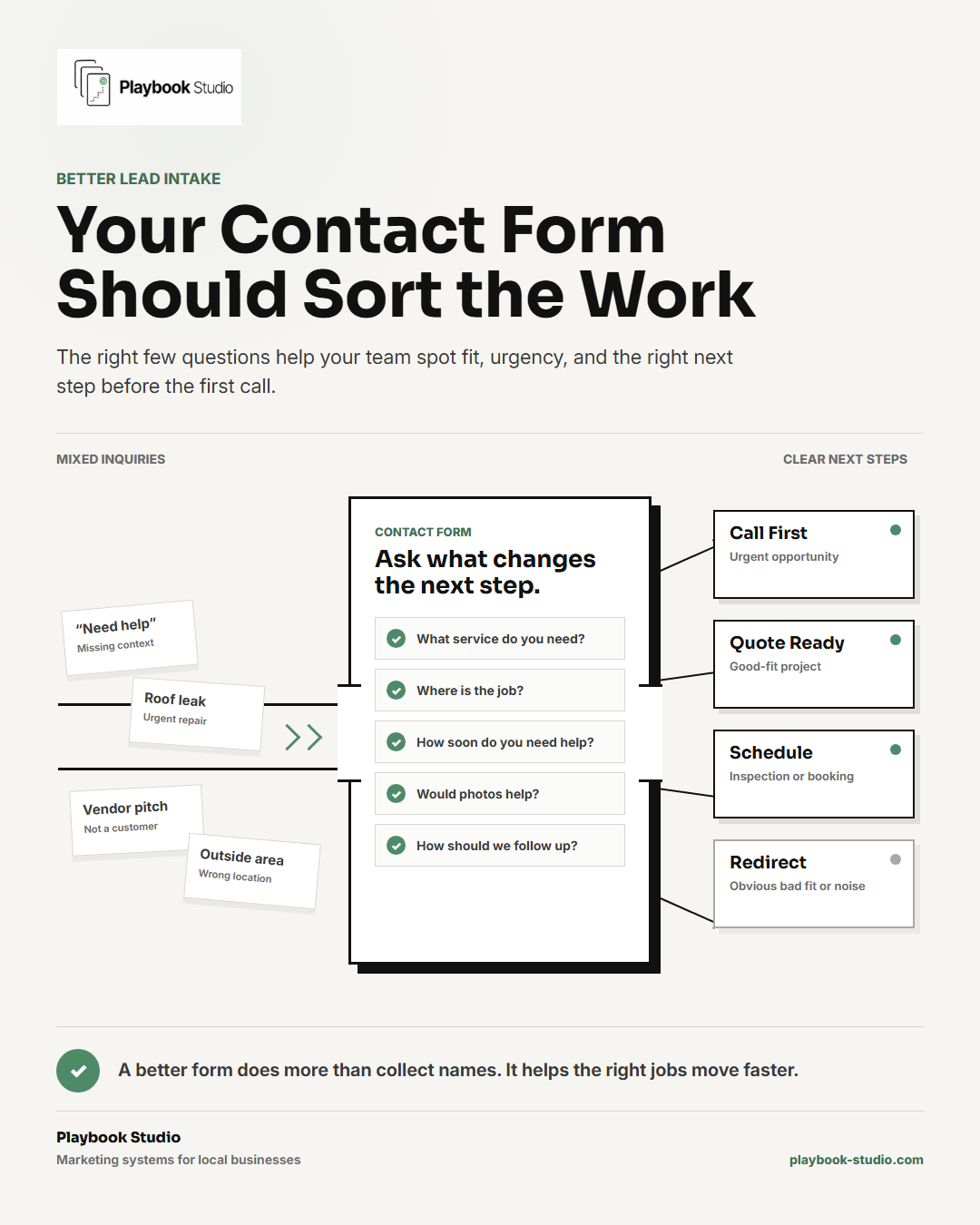
Most websites collect leads.
Better websites help sort them.
That difference matters more than most local businesses realize.
A basic contact form can get you a name, phone number, email, and a vague message like:
"I need help with a project."
That's better than nothing.
But it still leaves your team doing all the sorting after the lead comes in.
What kind of job is it?
Where is it?
How urgent is it?
Is it a service you actually offer?
Is it the kind of job your business wants?
Does the customer need a call, a quote, an inspection, a booking link, or a polite redirect?
If the form doesn't help answer those questions, every inquiry lands in the same pile.
Good jobs, tiny jobs, wrong-service requests, spam, vendor pitches, out-of-area leads, and urgent opportunities all look too similar at first.
That slows down follow-up.
It also makes your team spend more time sorting leads manually instead of responding fast to the ones that matter.
A contact form is part of your sales process
A lot of websites treat the contact form like a message box.
Name.
Email.
Phone.
Message.
Submit.
That setup is simple, but it doesn't always help the business act.
For a local business, the form has a bigger job.
It should help the customer explain what they need in a way your team can use.
It should help your team understand the job before the first call.
And it should make the next step easier to choose.
That doesn't mean every form needs to be long.
It means the form should ask the right few questions.
A roofing company may need to know if the customer wants repair, replacement, storm damage help, or an inspection.
A clinic may need to know which service the patient is asking about and whether they are a new or returning patient.
A restaurant may need to know whether the inquiry is about catering, a private event, a reservation issue, or a vendor pitch.
A retailer may need to know if the customer is asking about product availability, a repair, a return, or a custom order.
Different inquiries need different next steps.
If the form doesn't help separate them, your team has to figure it out later.
Weak forms make every inquiry look the same
The problem with a weak contact form isn't only that it collects too little information.
The problem is that it makes different leads look equal.
An urgent job looks like a general question.
A wrong-service request looks like a possible customer.
A good-fit project looks like a vague message.
A vendor pitch looks like a lead until someone reads it.
An out-of-area request gets the same attention as a job right inside your service area.
That creates friction inside the business.
Someone has to open the message, read between the lines, call or email back, ask basic questions, wait for a reply, and then decide what should have happened next.
Sometimes that's fine.
But when the team is busy, that extra sorting creates delays.
The better lead sits in the same inbox as the noise.
The urgent request waits while someone figures out whether another inquiry is even real.
The owner gets pulled into questions that a better form could have answered up front.
That's how a form problem becomes a follow-up problem.
The form should help identify the job before the first call
A better contact form helps your team understand the lead faster.
It doesn't need to ask everything.
It needs to ask the information that changes what happens next.
For many local businesses, that includes:
- the service the customer needs
- the city, zip code, or service address
- how soon they need help
- whether the request is urgent
- the type or size of the job
- photos or files when they would help
- a short description of the problem
- how the customer prefers to be contacted
Some businesses may also need a budget range, project timeline, property type, appointment preference, or whether the customer is a new or returning customer.
The right fields depend on the business.
The test is simple:
Does this question help us respond better?
If the answer is yes, it may belong on the form.
If the answer is no, it may just be friction.
Qualification should feel helpful, not like an application
There's a balance here.
Too few questions create messy leads.
Too many questions can scare off good customers.
A contact form should not feel like a job application unless the customer is making a serious, high-commitment request.
Most people will answer a few useful questions if the form feels normal and relevant.
They are more likely to complete it when the questions clearly help the business respond.
For example:
"What service do you need?" feels normal.
"What city is the job in?" feels useful.
"How soon do you need help?" makes sense if timing matters.
"Upload photos if you have them" can help a contractor, clinic, repair service, or custom shop understand the issue faster.
But a long form full of required fields can create the opposite problem.
The customer may leave before they ever reach out.
The goal isn't to interrogate the lead.
The goal is to collect enough information to make follow-up easier.
Better forms create better follow-up
The real benefit isn't the form itself.
The real benefit is what the form makes possible after the customer submits it.
A better form helps your team:
- spot good-fit jobs faster
- prioritize urgent requests
- avoid wasting time on obvious wrong-fit inquiries
- prepare before calling back
- send the right next step sooner
- route different requests to the right person
- make the business feel more organized
That matters because speed alone isn't enough.
Fast follow-up is stronger when it is informed follow-up.
If your team already knows the service, location, urgency, and job details, the first response can be more useful.
Instead of calling just to ask, "What do you need?" your team can call with context.
They can say:
"I saw you need help with a roof leak in Round Rock. Is the leak active right now, or are you looking to schedule an inspection?"
That's a better first conversation.
It feels more organized.
It respects the customer's time.
And it helps the business move the right jobs forward faster.
Bonus: block obvious bad-fit keywords
Some forms can also block, flag, or filter obvious bad-fit submissions.
This can help a lot when the same types of bad inquiries keep showing up.
You might block or flag keywords tied to:
- services you don't offer
- cities or areas you don't serve
- spam phrases
- sales or vendor pitches
- tiny job types you don't take
- emergency requests if you don't offer emergency service
- hiring requests if the form is only for customer inquiries
The goal isn't to block every imperfect lead.
You don't want to accidentally shut out a good customer because they used the wrong word.
The goal is to reduce obvious noise.
If vendor pitches keep hitting the main contact form, filter them.
If people keep asking for a service you stopped offering, route them to a clear message instead of letting the request hit the sales inbox.
If you don't serve a city, make that clear before the customer expects a callback.
Simple filters can keep the main lead inbox cleaner.
That helps the real opportunities stand out.
Check your own contact form
Open your contact form like a busy owner or office manager who has to respond to every submission.
Then ask:
- Can we tell what service the customer needs?
- Can we tell where the job is?
- Can we tell how urgent it is?
- Can we tell whether this is likely a good-fit job?
- Can we prepare for the first call before calling back?
- Are we asking anything that doesn't help follow-up?
- Are we missing any question that would save time later?
- Are obvious spam, vendor, or wrong-service requests getting through too easily?
- Does the customer know what happens after submitting the form?
If the answer is unclear, the form may be doing too little.
It may be collecting leads without helping your team work them.
That's the difference between a form that captures contact info and a form that supports the sales process.
Bottom line
Your contact form should not just collect names and phone numbers.
It should help your business understand the job, spot fit, and respond with the right next step sooner.
Most websites collect leads.
Better websites help sort them, qualify them, and make follow-up easier for the jobs the business actually wants.
If your website gets inquiries but your team still has to sort through vague, incomplete, or wrong-fit requests manually, Playbook Studio can review the contact path and map what your form should ask, what it should skip, and how to make follow-up easier.
Not sure what your contact form should ask?
Playbook Studio can review your contact path and map the questions, filters, and follow-up steps that help the right jobs move faster.
More local business website fixes
- How Can You Turn More Estimates Into Customers?
- How to Build a Referral System That Generates Leads
- If You're Not Using a CRM, You're Losing Business
- Calls to Action Are Weak
- You Sound Like Everyone Else
- Website Traffic but No Leads?
- Does Your Website Build Enough Trust?
- Why Your Website Is Not Building Trust
- Site Does Not Explain Services Clearly
- How to Tell What Marketing Is Working
- How Fast Should You Follow Up With Leads?
- Why Don't Leads Turn Into Bookings?
- Should You List Service Pricing?
- Why Your Google Business Profile Gets No Calls
- Your Website Should Tell Us Where You Work
- Tired of Buying Junk Leads?